Detect AI-Generated Videos
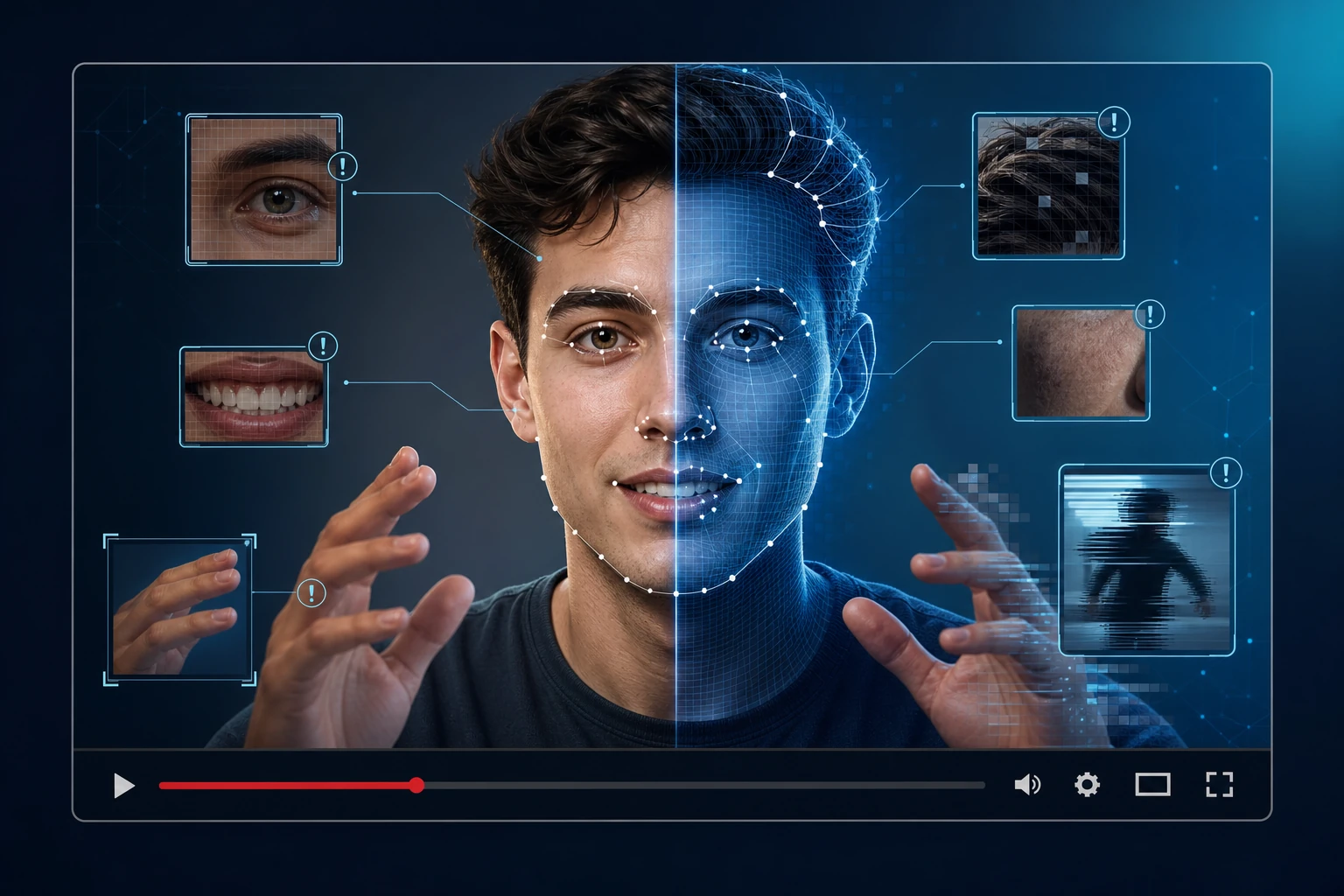
**Short answer:** To detect AI-generated videos, look for unnatural facial movements, inconsistent lighting, blurred edges, and temporal glitches across frames. Run the video through an automated detector like AI Video Detector for a probability score and evidence frames, then cross-check the result with source verification and manual review.
AI-generated videos are everywhere in 2026. Social feeds, news clips, product demos, political ads — synthetic footage has become cheap to produce and hard to distinguish from real recordings. If you work in journalism, content moderation, education, or brand safety, you need a reliable method to separate genuine video from AI-generated content. This guide walks through the visual tells, the automated tools, and the verification workflow you should follow.
Why AI-Generated Videos Are Harder to Spot in 2026
Early deepfakes had obvious flaws: waxy skin, frozen backgrounds, uncanny valley expressions. Modern generation models — Sora, Veo, Kling, Runway — produce footage that can fool most viewers on first watch. These models generate entire scenes from text prompts or swap faces with a few minutes of training data. The resolution is higher, the motion is smoother, and the artifacts are subtler. That said, every generation method still leaves traces. The question is knowing where to look.
7 Visual Red Flags to Check
Run through these signs every time you watch a video that feels "off":
**1. Unnatural blinking or eye movement.** Real people blink at regular intervals. Deepfakes often show subjects who rarely blink, blink at irregular intervals, or blink with both eyes perfectly synchronized — something real humans rarely do.
**2. Skin texture that's too smooth or inconsistent.** AI models tend to produce skin that looks airbrushed in some regions while losing detail in others — especially around the jawline, ears, and hairline. Look for sudden texture shifts when the subject turns their head.
**3. Lighting mismatches.** The light on the face should match the environment. Check whether shadows fall in the same direction on the face and on surrounding objects. AI-generated faces sometimes have lighting that contradicts the scene's light source.
**4. Lip-sync errors.** If the video has audio, watch the lips closely. AI-generated speech often produces consonant shapes that don't quite match the sound. Pauses may land in unnatural places — a cloned voice might rush through a sentence that a real speaker would deliver slowly.
**5. Background inconsistencies.** AI struggles with complex backgrounds. Look for objects that warp, merge, or change shape between frames. Repeating patterns — like a flag waving in the exact same rhythm — are a common tell.
**6. Hair and fine detail.** Hair remains one of the hardest elements for AI to render. Strands may merge into a solid mass, lose detail at the edges, or behave unnaturally in motion. Teeth have a similar problem — they often blur into a white shape during wide smiles.
**7. Temporal glitches.** Pause the video and scrub frame by frame. AI-generated footage may show sudden morphing, where one frame's face shape doesn't smoothly transition to the next. Earrings, glasses, and other accessories can flicker or shift position unnaturally.
How Automated Detection Tools Work
Automated detectors like AI Video Detector analyze the video across multiple signal types simultaneously. The tool breaks the video into frames, examines temporal consistency between consecutive frames, checks facial landmark stability, and looks for compression artifacts typical of AI generation pipelines. The output includes a confidence score, a verdict (likely AI-generated or likely authentic), and evidence frames that highlight exactly where the tool found suspicious signals.
No automated tool is 100% accurate. Generation models evolve, and detectors must keep up. But automated screening is far faster and more consistent than manual review alone — especially when you're processing dozens of clips per day. For a detailed comparison of detection approaches, see Detection vs Content Credentials. If you need enterprise-scale moderation, Hive Moderation offers bulk processing across video, image, and audio formats.
Step-by-Step: How to Verify a Suspicious Video
Follow this workflow whenever you encounter a video that might be AI-generated:
**Step 1: Watch the full video once without pausing.** Note your gut reaction. Does anything feel unnatural about the motion, the audio, or the person's behavior? Trust your instinct, but don't stop there.
**Step 2: Run it through an automated detector.** Upload the video file or paste the URL into AI Video Detector. Review the confidence score and the evidence frames. If the result is clean and the source is trusted, you can likely move on.
**Step 3: Scrub frame by frame if flagged.** If the tool raises concerns, pause at the flagged frames and inspect the red-flag areas listed above — eyes, skin, lighting, hair, background.
**Step 4: Check the source.** Where did the video come from? Is the uploader a verified account? Has the video been posted elsewhere with a different context? Use reverse video search — see our guide on Reverse Video Search — to find earlier instances of the same footage.
**Step 5: Cross-reference with metadata.** If available, check the video's EXIF data, creation date, and encoding parameters. AI-generated videos often lack the metadata that real camera recordings carry.
**Step 6: Escalate to manual expert review if needed.** For high-stakes content — public figures, legal disputes, financial claims — don't rely on automated results alone. Engage a human verification expert.
Verification Checklist
Use this checklist for every video you need to verify:
- Watched the full video at normal speed
- Checked for unnatural blinking and eye movement
- Inspected skin texture and hairline transitions
- Verified lighting consistency between face and environment
- Tested lip-sync accuracy (if audio present)
- Scrubbed frame-by-frame at flagged timestamps
- Ran through an automated detection tool
- Checked the upload source and account history
- Ran a reverse video search for earlier appearances
- Reviewed metadata (if available)
- Escalated to expert review (if high-stakes)
Can Free Tools Detect AI Videos?
Free tools like Deepware Scanner and WasItAI provide basic detection capabilities. They can catch obvious fakes and give you a starting point. However, free tiers typically have file size limits, fewer analysis signals, and no evidence frame output. For serious verification work — journalism, legal evidence, brand safety — a dedicated tool like AI Video Detector with detailed evidence output is worth the investment.
Why No Single Method Is Enough
Detection is a layered problem. Automated tools catch statistical patterns humans miss. Human reviewers catch contextual clues tools miss. Source verification catches provenance issues neither can detect alone. The strongest verification workflows combine all three: automated screening as a fast first pass, manual review on anything flagged, and source cross-referencing throughout. For the full picture on detection techniques, see Deepfake Detection Techniques 2026.
FAQ
### What is the quickest way to tell if a video is AI-generated?
Upload it to AI Video Detector for an automated scan. The tool returns a verdict with evidence frames in seconds. For a manual check, focus on the eyes (blinking rate), skin texture (too smooth or inconsistent), and lip-sync accuracy.
### Are AI video detectors accurate?
Modern detectors achieve high accuracy on known generation models, but no tool guarantees 100% results. Detection accuracy depends on the generation method, video quality, and how current the detector's training data is. Always combine automated results with manual review and source verification.
### Can I detect AI videos just by watching them?
Sometimes. Obvious fakes have visible artifacts — waxy skin, morphing backgrounds, unnatural motion. But modern generation models produce footage that can fool most viewers. Automated tools analyze signals that human eyes can't easily perceive, such as frame-to-frame pixel consistency and compression artifacts.
Sources
How This Article Was Created
This article was written by the AI Video Detector product team based on hands-on testing of detection workflows with public and synthetic video samples. No third-party editorial review was involved.